Not today, macOS: Demystifying OS update deferrals across Apple platforms
An in-depth look at OS update deferrals across iOS, iPadOS, and macOS. Exploring how deferral windows behave to help you navigate nuances and maintain fleet compliance.
When Apple’s major OS release comes around, it’s usually not until the maximum 90-day deferral window starts to expire that threads and questions begin appearing on the Mac Admins Slack from admins questioning why devices are seeing OS update versions they expected would be hidden - or conversely, why a version they hoped would be visible is completely missing.
Most of the time, this boils down to a misunderstanding of how deferrals actually function under the bonnet.
I’m hoping this post can serve as a go-to reference resource to help clear up the confusion and navigate platform nuances, to help keep your devices and users safely on the right update track.
What are OS Update Deferrals?
In short, OS update deferrals are a mechanism across Apple platforms that lets admins control exactly which OS versions users see when they check Software Update.
Think of it as a way to prevent your users from accidentally leaping ahead to a brand spanking new release before your $Org is actually ready for it.
Apple provides the ability to defer software updates for a maximum of 90 days from the date of release.
SOFA, from Mac Admins Open Source has a great table for easily tracking drop dates for common deferral durations across all of Apple’s Managed Platforms.
How are they applied?
At the time of writing we’re in the midst of a crossover between MDM and DDM controls for a number of settings, including OS update deferrals.
Pre-AppleOS 26.0
Deferrals were applied using the com.apple.applicationaccess preference domain.
If you’re using configuration profiles for deferrals, you’ll likely spot a combination of these keys:
- enforcedSoftwareUpdateDelay
- enforcedSoftwareUpdateMajorOSDeferredInstallDelay
- enforcedSoftwareUpdateMinorOSDeferredInstallDelay
- enforcedSoftwareUpdateNonOSDeferredInstallDelay
- forceDelayedAppSoftwareUpdates
- forceDelayedMajorSoftwareUpdates
- forceDelayedSoftwareUpdates
AppleOS 26.X
With the AppleOS 26 releases it was announced these keys were deprecated, to be removed in a future version of the OS.
To maintain this functionality, but align to the - at the time - Future of Device Management, Apple provided a DDM replacement using the deferrals object in the com.apple.configuration.softwareupdate.settings declaration type.
To defer major updates for 90 days, minor updates for 30 days, and non-OS updates for 7 days on macOS, the declaration payload would look like this:
1
2
3
4
5
6
7
{
    "Deferrals": {
        "MajorPeriodInDays": 90,
        "MinorPeriodInDays": 30,
        "SystemPeriodInDays": 7
    }
}
To defer updates for 45 days on non-macOS Platforms (iOS/iPadOS, tvOS, and visionOS), the declaration payload would look like this:
1
2
3
4
5
6
{
    "Deferrals": {
        "CombinedPeriodInDays": 45
    },
    "RecommendedCadence": "Oldest"
}
AppleOS 27 and beyond…
The forewarned removal of MDM deferrals was confirmed to be realised in Apple’s release of the version 27 OS, meaning the only way to defer upgrades and updates on devices running version 27 or later is via the DDM controls above.
In my testing on macOS 27 and 27.0.1, the MDM profile deferrals still apply and defer successfully.
However, as Apple have announced this has been removed my feeling is that it would be wrong to rely on this working as the 27 release progresses.
It may work now, but it may stop without warning…
Got it. So how do they work?
Broadly speaking, update deferrals function in the same way across all the applicable platforms (macOS, iOS, iPadOS, tvOS, and visionOS), but there are some nuances that need to be understood.
Before I continue, let me explain what an OS version number means.
| OS Version | Major | Minor | Maintenance/Patch |
|---|---|---|---|
| 27.0.1 | 27 | 0 | 1 |
| 26.7.1 | 26 | 7 | 1 |
| 26.6.2 | 26 | 6 | 2 |
As the deferral of maintenance/patch updates falls within the same control as minor updates on macOS, they’ll be included in the minor update behaviour within this post.
Firstly, let’s talk about macOS.
To understand the behaviour you should expect to see, you need to look at what you’re expecting from the perspective of the device’s current OS version.
| Majors |
|---|
| A device moving from macOS 15.8 to macOS 26.7.1, is a major upgrade. |
| A device moving from macOS 15.8 to macOS 27.0.1, is a major upgrade. |
| A device moving from macOS 26.7.1 to macOS 27.0.1, is also a major upgrade. |
If the major number of the OS version is increasing, the device will be following any specified deferrals for major upgrades - irrespective of what’s happening with the minor number(s).
| Minors |
|---|
| A device moving from macOs 15.8 to macOs 15.8.1, is a minor update. |
| A device moving from macOS 26.6 to macOS 26.6.2, is a minor update. |
| A device moving from macOS 26.6 to macOS 26.7, is also a minor update. |
If only the minor number is increasing, the device will follow any minor update deferral controls.
macOS is the only platform that allows for major and minor deferral periods to have differing values.
Misunderstanding how the deferral periods work can lead to some unintended consequences where versions you expect to be shown are hidden, or versions you expect to be hidden are shown.
Let me give an example to show what that means.
The timelines in this example are completely fictional, but they work for the purposes of the example so please bear with me.
Let’s say you have a fleet of macOS Devices running X version of macOS 26.
macOS 27 is released, and you have deferral periods of 90 days for majors, and 30 days for minors.
Let’s also imagine the following:
- macOS 27 was released on 1st September 2026
- macOS 27.0.1 was released 30 days later, on 1st October 2026
- macOS 27.1 is released 45 days after 27.0, on 16th October 2026
Here’s a timeline to help visualise those release dates: 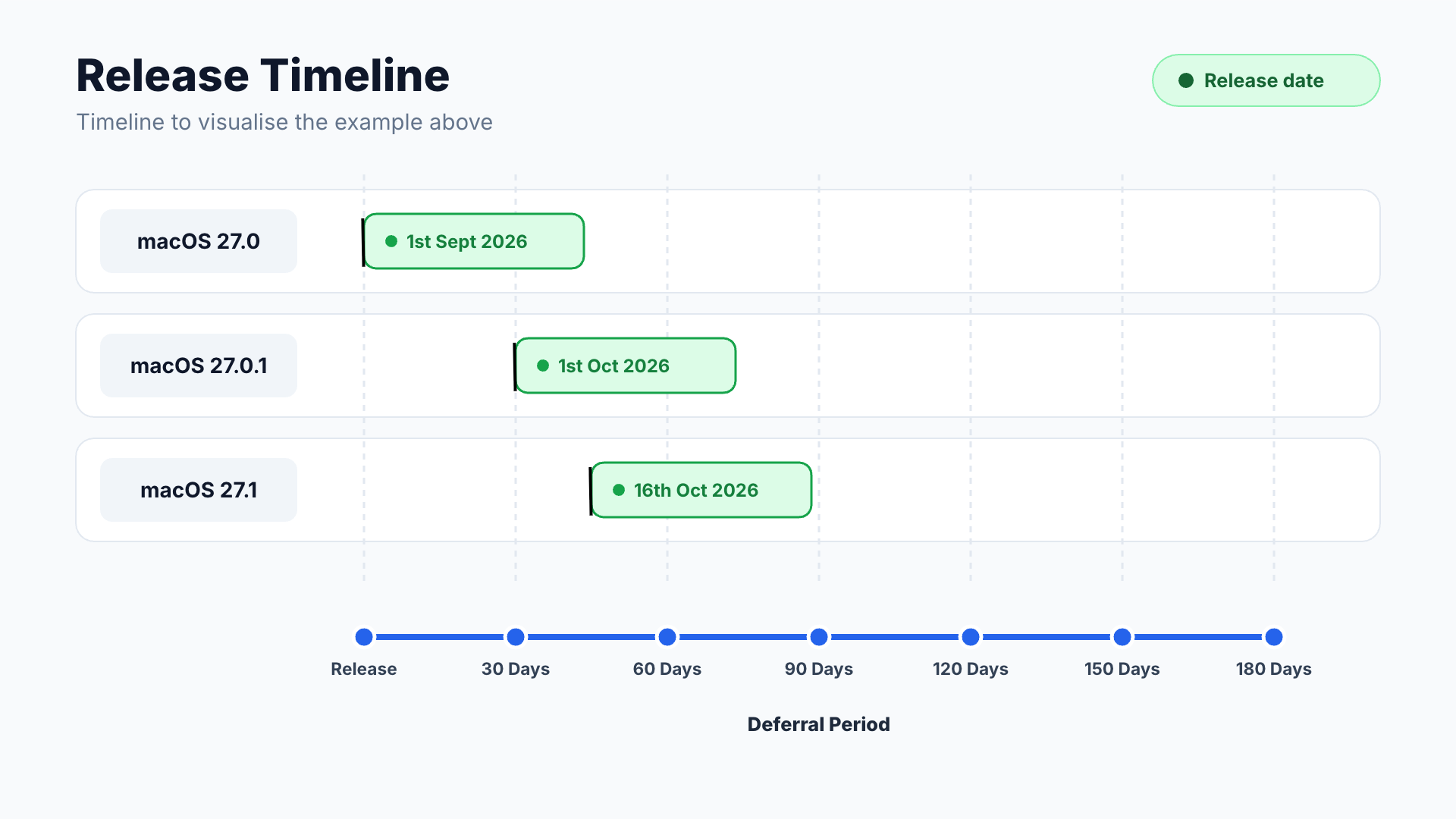
If you don’t push a Software Update enforcement declaration, macOS 27 will become visible on your fleet 90 days after release - which in this example would be 30th November 2026.
However, because more than 30 days have passed since macOS 27.0.1 was released, once the user had upgraded from macOS 26.X to macOS 27.0 they would then immediately be presented with the option to update to 27.0.1.
If you did push a Software Update enforcement declaration or had a client enrol into your DMS already running macOS 27.0, macOS 27.0.1 would be visible from 1st October 2026.
Once the device is on 27.0 or 27.0.1, macOS 27.1 would become visible on 30th December, which is 30 days after its release.
If a user did not upgrade from macOS 26.X to macOS 27.0 when it became visible and they were waiting for 27.0.1, that would become visible on 30th December 2026, which is 90 days after the 27.0.1 release date. Again, once they’d upgraded they’d immediately be presented with macOS 27.1 to update again.
Here’s a timeline to help illustrate the experience on device: 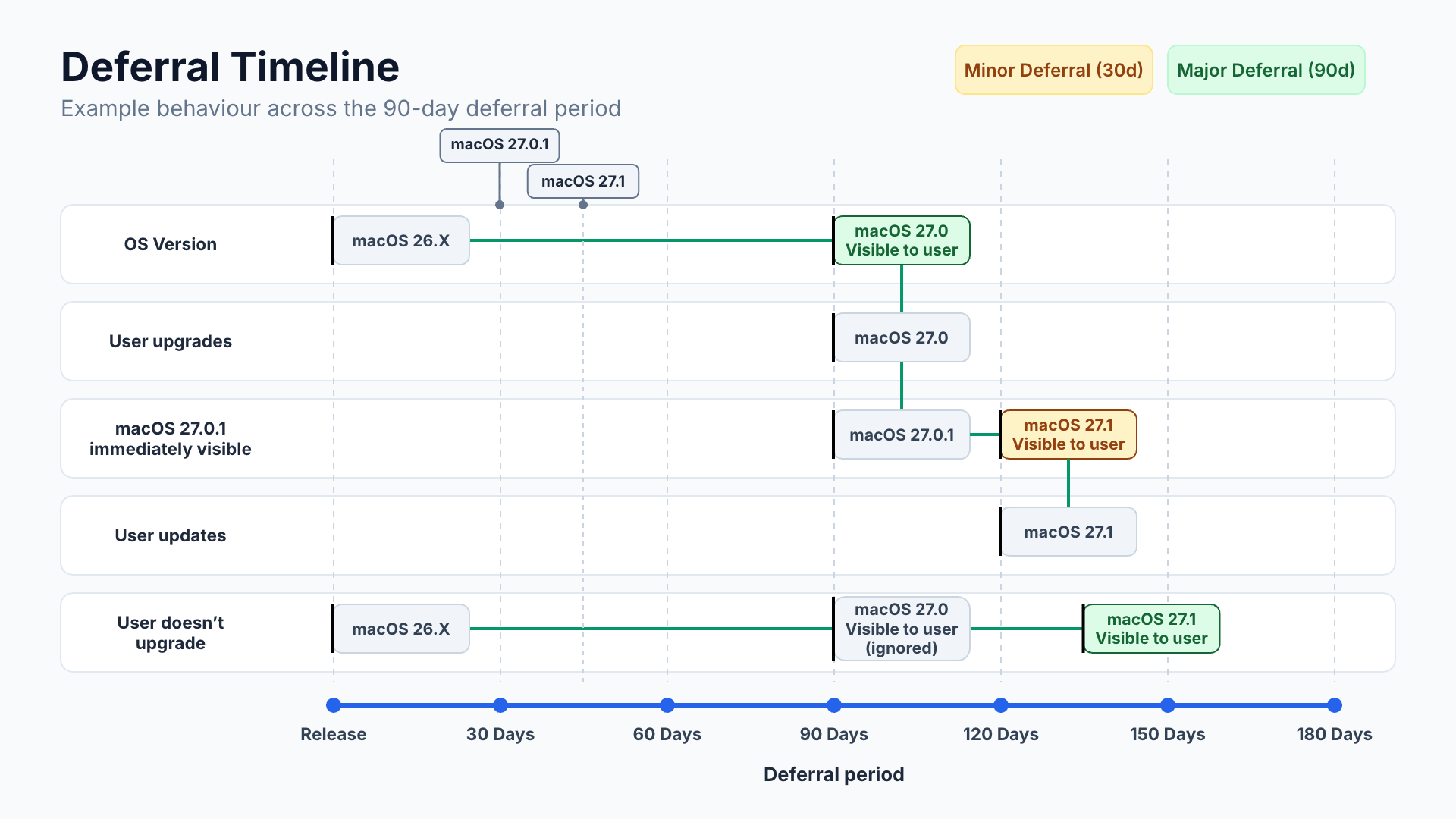
Most commonly I see people querying why their devices are seeing 27.0, and not 27.0.1 or 27.1 when the 90 day major upgrade deferral period has passed.
Each deferral starts from the date the OS version was released.
If you’re expecting your device to see a major upgrade, then it will not see it until the deferral period has lapsed for that specific release.
Now let’s talk about iOS/iPadOS
iOS and iPadOS platforms don’t differentiate between major and minor, but they do allow admins to set a RecommendedCadence to preference an upgrade over an update (or vice versa) should both deferrals lapse on the same date - which they often do!
To help explain how the RecommendedCadence key works, I have an iPhone and an iPad both running iOS/iPadOS 26.5.2.
At the time of writing, both iOS/iPadOS 27 and 26.7 were released 31 days ago. iOS/iPadOS 27.0.1 and 26.7.1 were released 17 days ago.
Based on those timings, I’ll use a deferral of 20 days for this example, as that should mean 27.0/26.7 are visible to the devices, and 27.0.1/26.7.1 remain deferred.
RecommendedCadence has 3 values:
- All
- Oldest
- Newest
This is the declaration payload I’ve deployed to my iPhone:
1
2
3
4
5
6
7
8
9
10
11
12
13
14
15
16
17
18
19
{
    "Type": "com.apple.configuration.softwareupdate.settings",
    "Payload":{
        "Notifications": false,
        "Deferrals": {
            "CombinedPeriodInDays": 20
        },
        "AutomaticActions": {
            "Download": "Allowed",
            "InstallOSUpdates": "AlwaysOff",
            "InstallSecurityUpdate": "AlwaysOn"
        },
        "RapidSecurityResponse": {
            "Enable": true,
            "EnableRollback": true
        }
    },
    "Predicate": "(devices.operating-system.family == 'iOS')"
}
This is what that looks like on the iPhone:
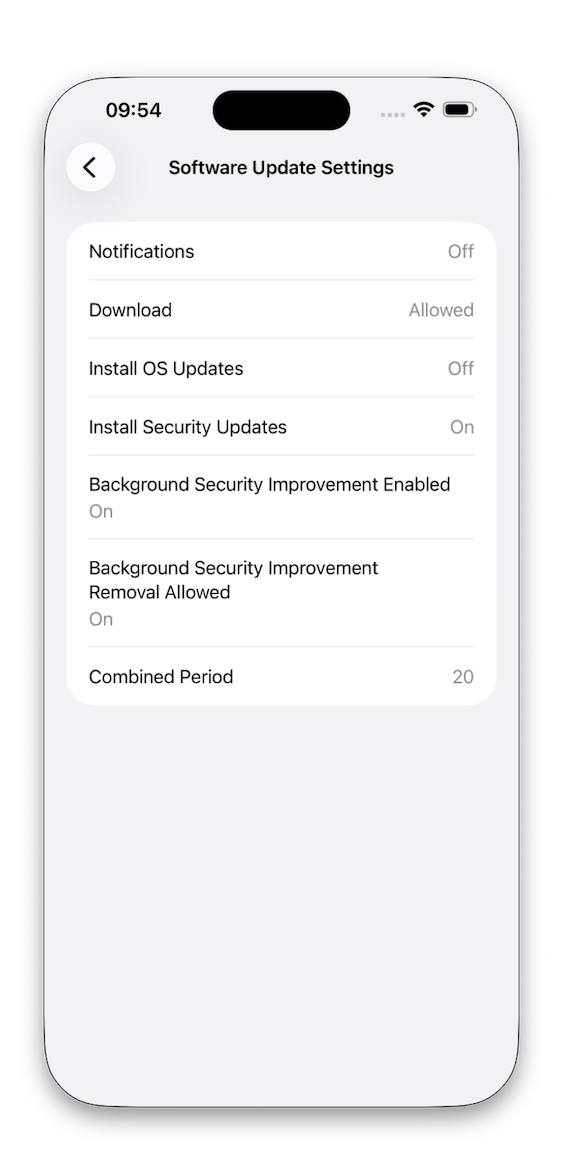
I have a similar declaration payload deployed to my iPad:
1
2
3
4
5
6
7
8
9
10
11
12
13
14
15
16
17
18
19
20
{
    "Type": "com.apple.configuration.softwareupdate.settings",
    "Payload":{
        "Notifications": false,
        "Deferrals": {
            "CombinedPeriodInDays": 20
        },
        "RecommendedCadence": "All",
        "AutomaticActions": {
            "Download": "Allowed",
            "InstallOSUpdates": "AlwaysOff",
            "InstallSecurityUpdate": "AlwaysOn"
        },
        "RapidSecurityResponse": {
            "Enable": true,
            "EnableRollback": true
        }
    },
    "Predicate": "(devices.operating-system.family == 'iPadOS')"
}
And this is what shows up on my iPad:
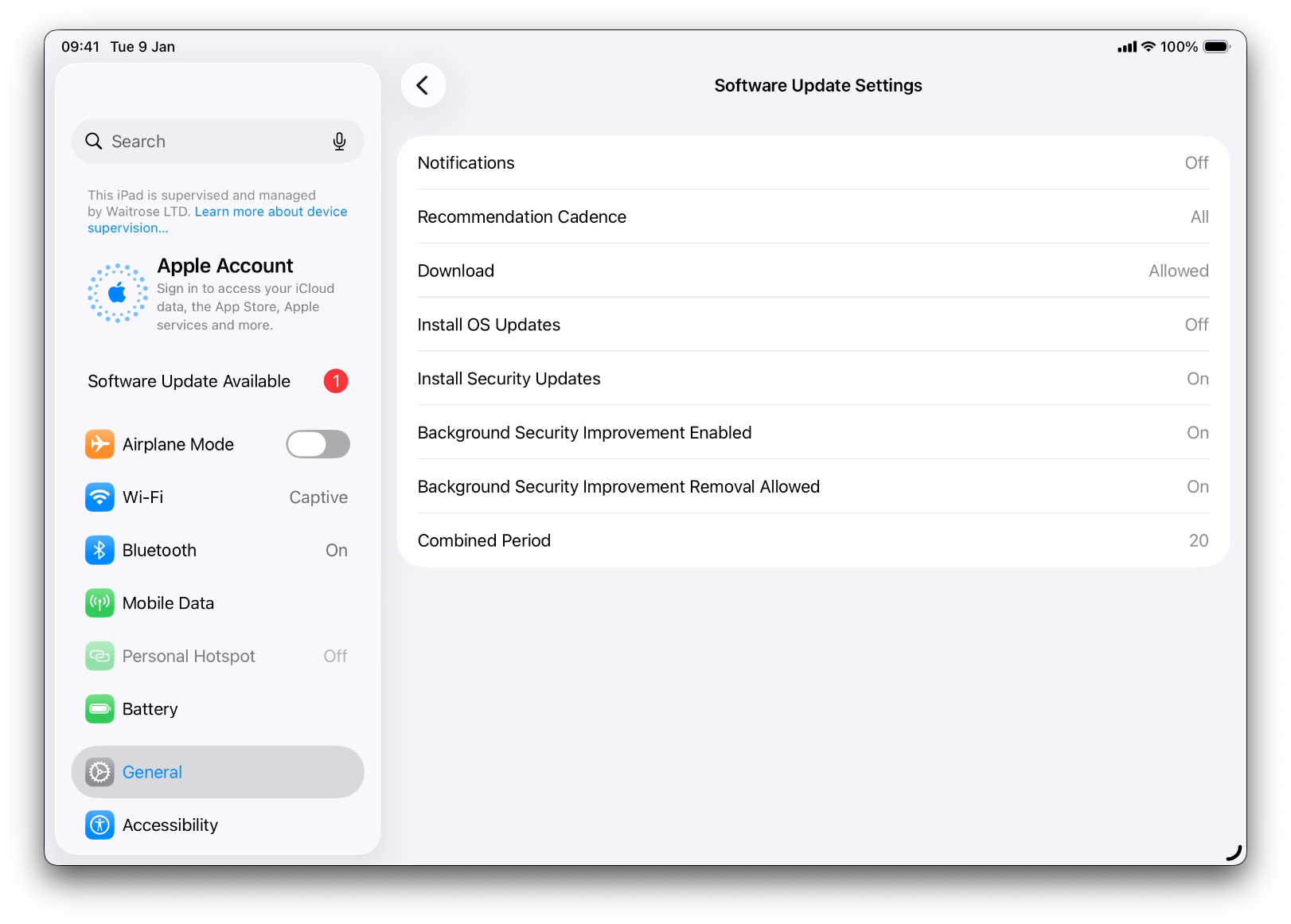
The difference here is I’m not using the RecommendedCadence key on the iPhone declaration, and I’m including it with the value of All on the iPad.
Both of the devices show the same experience to the user: 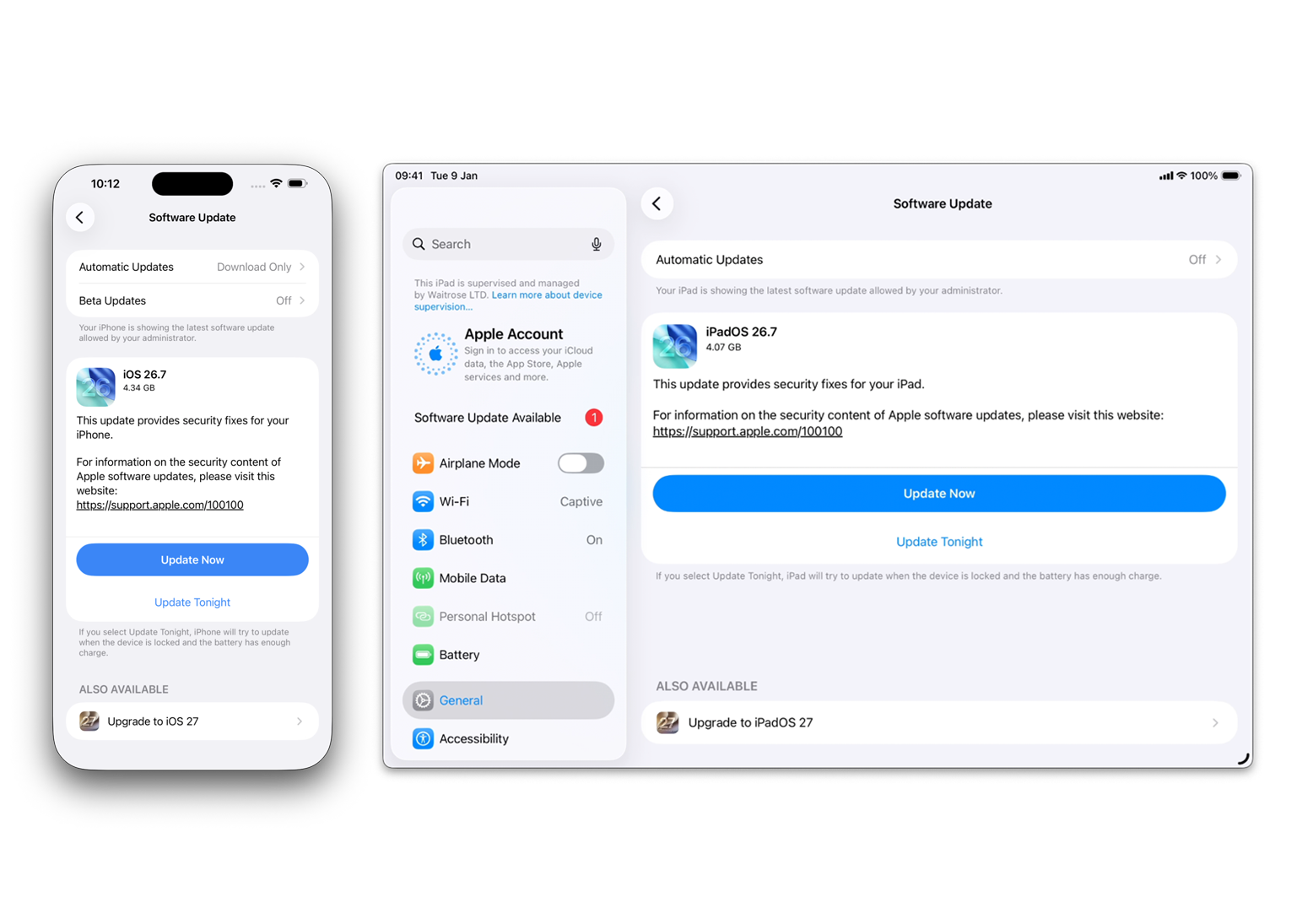
Now I’m going to change the RecommendedCadence value to Oldest on iPad, and Newest on iPhone.
We can see the declarations are reflecting those changes on the client side:
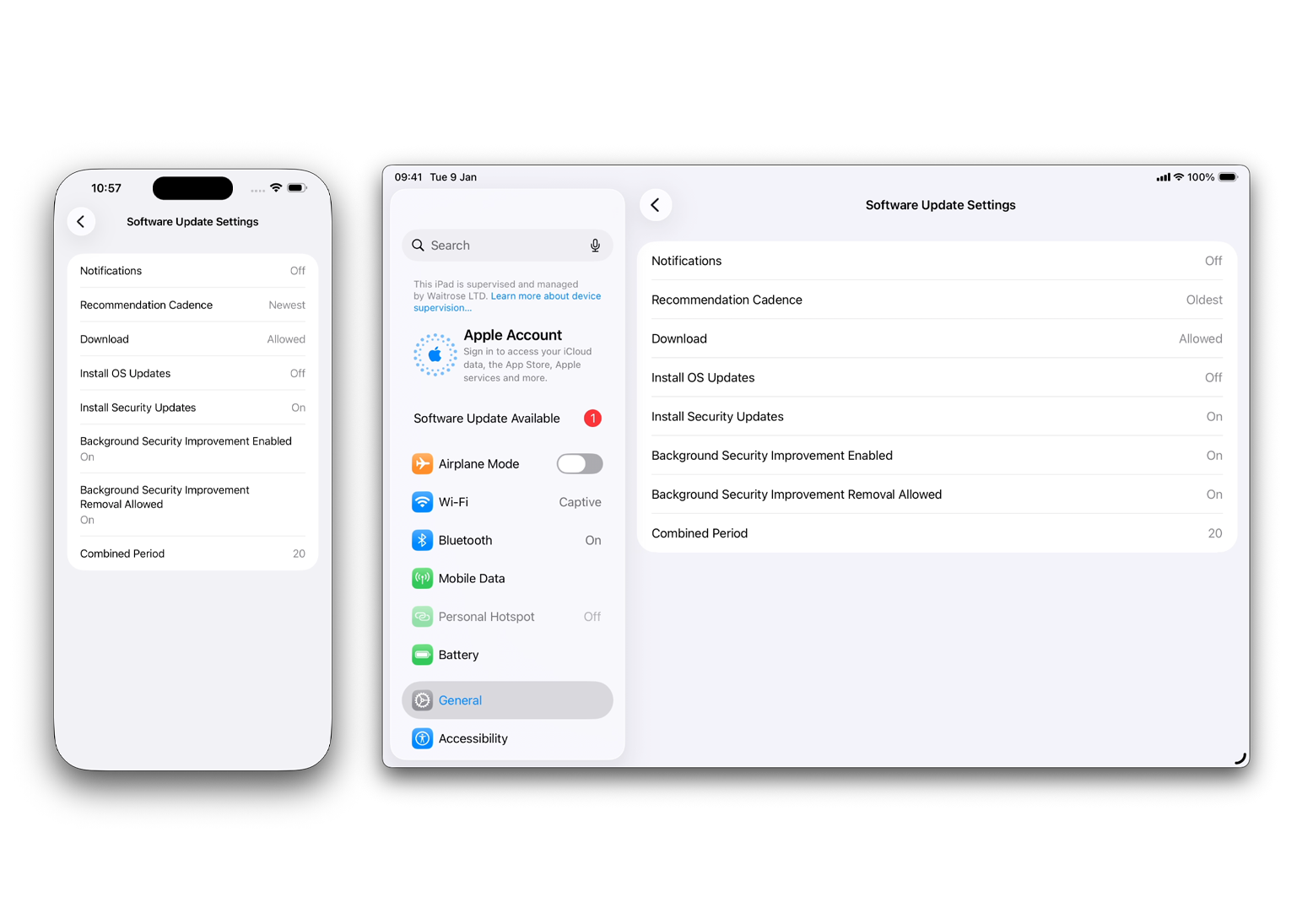
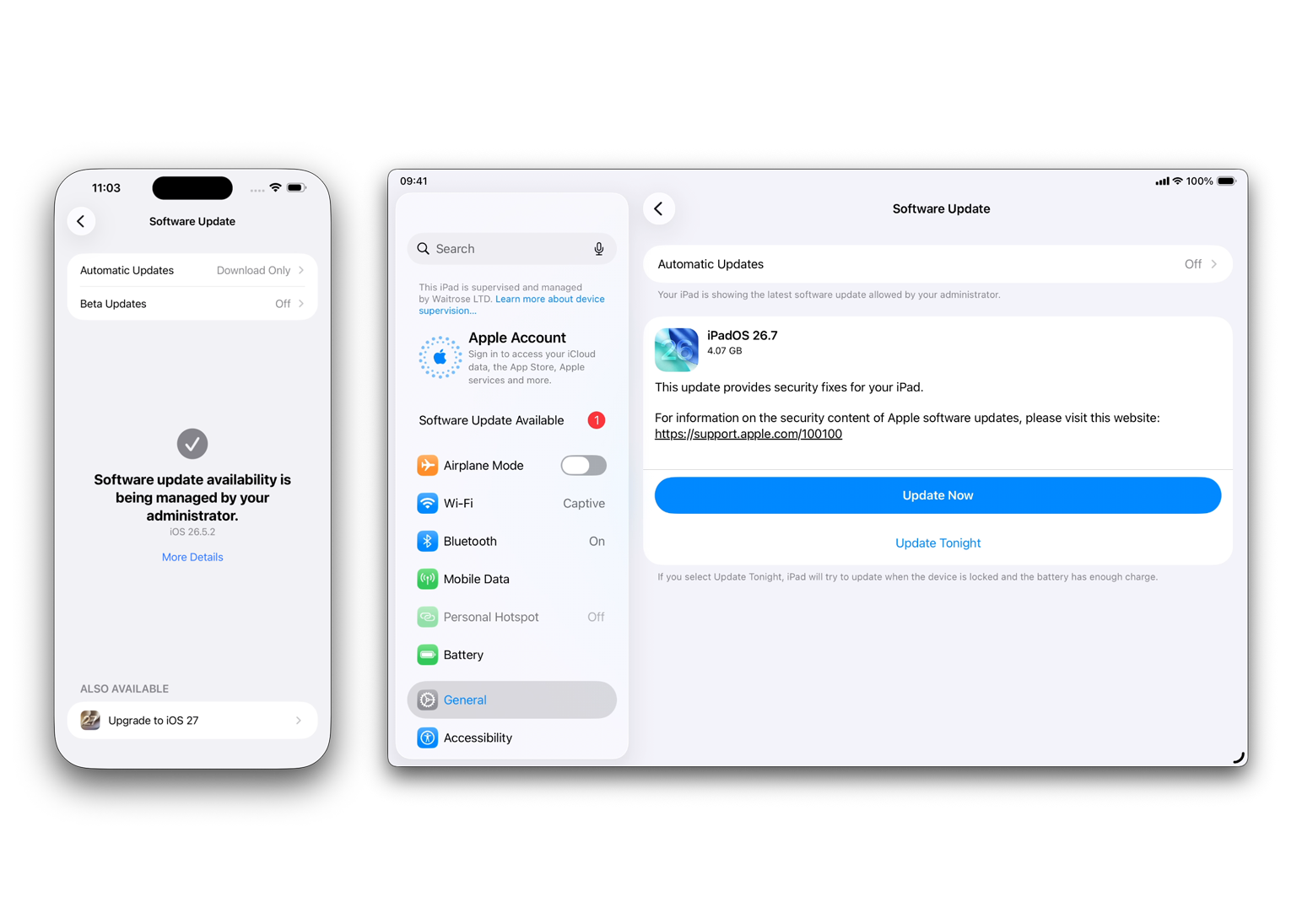
Now when we go to Software Update, the iPad is offered an update to iPadOS 26.7, but it is not offered an upgrade to iPadOS 27 at all
The iPhone is offered an update to iOS 27, but it’s not shown anything about 26.7.
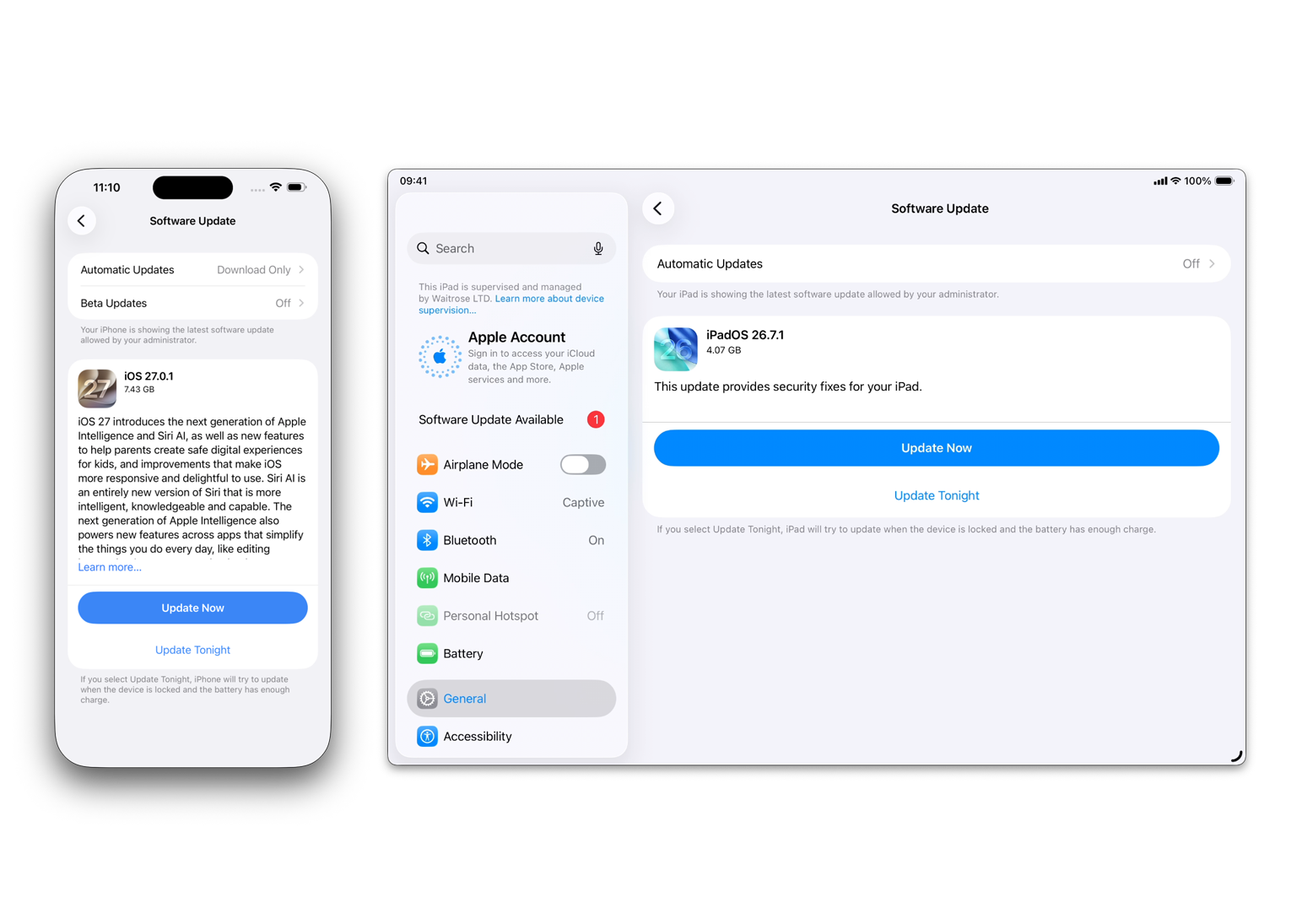
If I reduce the deferral period to show 26.7.1 and 27.0.1, again the offerings are shown relative to the RecommendedCadence value, but this time the iPhone is shown 27.0.1 on the first screen, without having to additionally select “Upgrade to iOS 27”.
What about tvOS and visionOS?
Because writing about platforms you don’t run in production is a fast track to looking like an absolute plum on the internet, I’ll keep this brief.
I don’t have any experience managing Apple TVs, or Vision Pros, so I don’t have first-hand understanding of how deferrals work on those platforms.
Having read the documentation I do expect that they follow the same pathway as iOS and iPadOS which I spoke about above, but I don’t want to write this and mislead someone into thinking I’ve got knowledge from real world experiences with those platforms.
TL;DR
There are a few key points that hopefully have been made clear above, but I’ll list them now:
- Each Software version is deferred from the day it is released
- Doing a major upgrade will always be deferred for however long you configure it for, from the day it is released
- macOS is the only platform that allows for different deferral lengths for major upgrades, and minor updates.
- iOS/iPadOS can achieve a similar outcome with use of the
RecommendedCadencekey. - I have no first-hand experience with tvOS or visionOS, but from what I’ve read they behave in the same way as iOS and iPadOS.
I haven’t touched on Software Update enforcement in this post, but there’s also an important call out for that configuration.
DDM Software Update enforcement plans do not respect deferrals.
As soon as an enforcement plan lands on a device, the OS version contained in that plan becomes visible to the user, whether it would be hidden by a deferral or not.
This is great from a UX perspective, as if you’re pushing a DDM SU plan then you would probably want your users to see the version you’re telling them they need to be on.
However, if you’re using a set-it-and-forget-it type approach, this can mean that deferrals become effectively moot, so you may need to factor that into your workflows.
Documentation links:
Apple’s Developer Docs for the Software Update Settings declaration: here
Apple’s GitHub YAML for the Software Update Settings declaration: here.