Déjà Vu... How changes to macOS 15.5 impact the use of Jamf Setup Manager
Continuing on from my previous post, this post dives into the changes to Setup Assistant in macOS 15.5+ and how they impact the use of Jamf Setup Manager
What changed previously?
If you weren’t aware, with the release of macOS 15.4, Apple made changes to the macOS Setup Assistant flow, which impacted certain implementations of Jamf Setup Manager.
These changes are best detailed in my previous post:
What’s changed this time?
Well, this is where it gets interesting.
With macOS 15.5, the Location Services pane has seemingly moved back to it’s previous location, appearing *during Setup Assistant, before the user has signed in.
This is where it lived in macOS from 15.0-15.3, so it stands to reason that if you had to make changes to your enrolment flow for 15.4/15.4.1, you can likely revert these for 15.5.
*Pun definitely intended.
But… I would do this with caution!
Why do I need to be cautious?
To be honest, there are a couple of reasons.
Will this change again?
Without working for Apple in a specific team or role, we’re highly unlikely to know what’s planned for any future changes to Setup Assistant.
- Was
Location Servicesmoved deliberately to after user sign-in? - Was it moved back as a result of some bugs?
We could hypothesise endlessly on this topic, but there are some outcomes to these questions which leave a sense of this could happen again in the future in the air.
Given the pain and difficulties this caused initially, I’d really rather not go through it again, so I’m looking at ways I can modify my implementation of Setup Manager to prevent any Setup Assistant changes from breaking it again.
What’s unlikely to change?
In my expert opinion (massive /s) there’s one part of the device onboarding process which is unlikely to change.
The presence of a Login Window
A login window is needed in any future device setup flow I can think of, as ultimately a user needs to sign into their account somehow…
This is great, as Jamf Setup Manager already contains a configuration option for admins to run Setup Manager over the login window, instead of during Setup Assistant, by setting the runAt key to loginwindow, instead of enrolment.
However, as mentioned in my previous post, there are other challenges with that flow if your organisation makes use of products like Jamf Connect, Xcreds, or similar.
Have a read of @scriptingosx’s post on this topic.
How do I manage different Setup Manager configurations?
The easiest way is to manage just one configuration.
This might seem really simplistic, but that’s the point.
It’s far easier to maintain something when it’s simple, and by having fewer configurations to manage you’re making it simpler!
On the face of it, this does present a challenge to admins to make sure devices are not on macOS 15.4/15.4.1 when they enrol into MDM, so devices are either on macOS 15.3 or earlier or are on 15.5 or later.
However, Apple have already released functionality within macOS to make this a moot issue and it’s already live in Jamf Pro
(n.b.: I don’t have access to other Jamf Products to confirm if it exists there).
Link to Apple’s Platform Deployment guide
Link to Jamf’s PreStage documentation
To make this as straightforward as possible, you can leverage these settings to specify a Minimum OS version at enrolment, and either:
- Set it to 15.5 explicitly
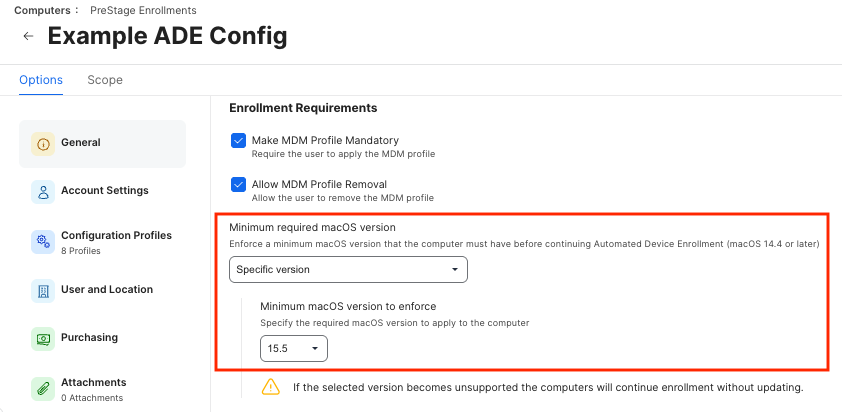
- Set it to the Latest Major version available
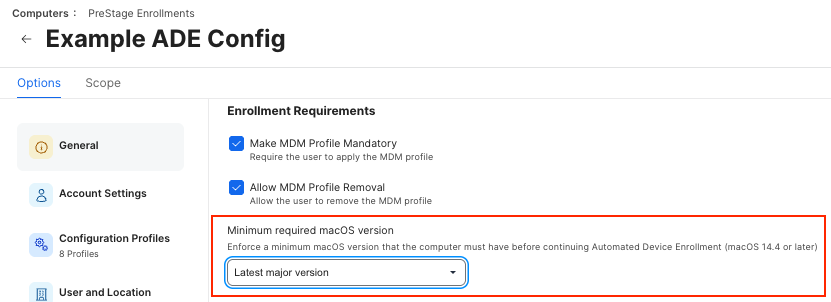
By setting one of these options, any macOS client that’s not on 15.5 should be forced to update its OS during Setup Assistant, before enrolment into MDM can complete.
Is this now best practice?
Same as before, it’s not.
The configuration choices made during an implementation of Setup Manager are still entirely at an organisation’s discretion.
What works for me, may not work for you, and that’s okay!
The tool deliberately has different ways to configure it to make it mouldable to your organistion’s use case.
But I would consider my previous point as the closet thing to best practice I’m prepared to declare:
- Make sure you join AppleSeed for IT if you’re able to. You can get hands-on with Beta versions of macOS before they’re released, and find solutions for your organsation before the GA release.